


When you trade on platforms like Coinbase, other crypto exchanges, or stock markets like Nasdaq, you’ll come across several ways to buy or sell assets. Some options are simple and quick, while others require more knowledge but give you greater control over your trades.
For example, if you’re using Coinbase, the basic trading screen lets you just type in how much crypto you want to buy and hit “Buy.” It automatically processes your purchase at the current market rate. Selling works just as easily — go to your portfolio and click “Sell.”
However, if you want to be more strategic — maybe you expect the price to rise or fall soon — you can switch to Advanced Trading.
This feature allows you to set your own desired prices. To use this option properly, it’s important to understand the different types of orders available. Let’s break them down in simple terms.
Coinbase is introducing more Advanced Trading tools to give users a broader set of options. The concepts explained here apply not just to Coinbase or crypto but also to stock markets, making them valuable for anyone interested in trading.
There’s also a video series that explains how to use these tools and features step by step through the Coinbase app or website.
What Is an Order Book?
An order book is a real-time list of current buy and sell orders for a specific asset. The buy orders are called bids, and the sell orders are known as asks or offers. The order book shows both the price people are willing to pay and how much of the asset they want to buy or sell at each price level.
On Coinbase, there are billions of dollars worth of buy and sell orders constantly matched between users. For each crypto listed, you can view its order book — buy orders (in green) appear on one side and sell orders (in red) on the other.
Let’s say Bitcoin (BTC) is trading around $62,000. Sell orders (asks) will appear from the top down in descending price order, while buy orders (bids) will appear from the bottom up in ascending price order. The gap in between is called the spread — the difference between the lowest sell price and the highest buy price.
If you believe Bitcoin is overpriced at $62,000, you could set a limit order to buy 10 BTC at $59,000. On the other hand, if someone thinks the price is heading up, they might place a limit order to sell 10 BTC at $65,000.
However, keep in mind that if the market never reaches those prices again, your orders may not be filled. To manage this, you can choose how long your order stays open by setting a “Time in Force” — meaning your order can be active for a set time or until canceled.
1. What Is a Market Order?
Definition:
A market order is an instruction to buy or sell an asset instantly at the best available current price.
If your goal is to complete a trade immediately — without worrying too much about the exact price — a market order is ideal. For a buyer, it will usually fill at the lowest available ask price, while for a seller, it fills at the highest available bid.
Market orders are perfect when the market is moving quickly, and you want to act fast. But there’s a catch — you might not get the most favorable price, especially if you’re trading large amounts. This is due to slippage, where part of your order is filled at a worse price because there weren’t enough units at the price you started with.
For example, buying 1,000 BTC with a market order could move the market and cost more overall than expected. If you want to be more precise with your price and timing, consider using a limit order instead.
2. What Is a Limit Order?
Definition:
A limit order allows you to set the maximum or minimum price you’re willing to pay or accept. It only executes if the market reaches that price or better.
Let’s say Bitcoin is at $62,000, but you think it might drop. You can place a limit order to buy 0.1 BTC at $60,000. This means you’ll only pay that amount (plus fees), not the higher market price.
Your order will be added to the order book and will only execute if someone is willing to sell at $60,000 or lower. The benefit is you control the price, especially when buying or selling large quantities. But the downside is your trade might never go through if the price doesn’t reach your limit.
Limit orders are ideal for patient traders who are targeting specific price points.
3. What Is a Stop-Limit Order?
Definition:
A stop-limit order is a more advanced order that lets you automatically place a limit order after the price hits a certain stop price. This is great for protecting profits or cutting losses.
This order type includes two parts:
- Stop price: The price that activates your order.
- Limit price: The price at which your order will be executed or better.
These two prices don’t have to be the same. For example, you might have bought 0.1 BTC at $62,000, but now you’re worried the price might fall. You can set a stop price at $55,000 and a limit price at $54,950. If BTC hits $55,000, your limit order to sell at $54,950 or better gets triggered.
This strategy helps prevent you from selling at an even lower price if the market suddenly drops. However, in very fast or illiquid markets, the order might not get filled at all.
Alternatively, if BTC surges to $69,000, you might want to protect your gains. You can set a stop-limit order to sell if it falls back to $65,000, and only if the price is $65,000 or better. Again, if the market price drops below your limit, the order won’t execute — so you must weigh the risks.
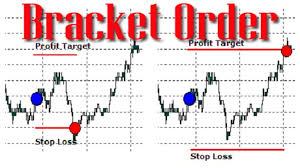
4. What Is a Bracket Order?
Definition:
A bracket order is an advanced trading tool that lets you set both a take-profit (limit) and a stop-loss at the same time for a single trade.
It’s like putting your trade in a bracket — whether the price goes up or down, one side of the order will be triggered, and the other will cancel automatically.
Let’s say you own 1 BTC, and it’s priced at $62,000. You want to either:
- Sell at a profit if the price hits $65,000, or
- Cut your losses if it drops to $59,000.
With a bracket order, you can set both these conditions. If the price climbs to $65,000, a limit order sells your BTC at that price or better. If the price drops to $59,000, a market order sells your BTC right away to avoid bigger losses. Once one condition is met, the other is canceled — giving you peace of mind in volatile markets.
Bracket orders are different from stop-limit orders because they include both an upper and lower price range to manage profits and risks simultaneously.
Final Thoughts
There is no single “best” order type. Your choice depends on your trading goals, risk tolerance, and how actively you follow the market.
- Market orders are quick but may be less precise.
- Limit orders offer price control but don’t always fill.
- Stop-limit orders help you automate risk management.
- Bracket orders allow you to lock in profits or cut losses — all in one trade.
As prices in crypto and stock markets can change rapidly, understanding these tools gives you more control and helps you make smarter decisions when buying or selling.
Note: Advanced trading features are best used by experienced traders. Always be aware of platform fees and market risks before placing any order. Trading involves real financial risk, especially in volatile assets like cryptocurrencies.
Join Gen Z New WhatsApp Channel To Stay Updated On time
https://whatsapp.com/channel/0029VaWT5gSGufImU8R0DO30
